Procedural Adjustments
- Errant Paths 1.2 and later
- Errant Paths 1.1 and prior
Path Adjustments procedurally process a Path's PathSpline and PreSpawnSpline during generation, for example by smoothing, projecting onto terrain, randomizing their shape, or adding an offset.
Adding adjustments to a Path
Path Adjustments are configured in the PathDescription, in the Path Adjustments list of the Path Adjustment category:
- Click the + button to add a new entry to the list.
- Select the adjustment type in the dropdown of the new entry.
- Expand the entry and configure the adjustment's properties.
The adjustments are applied in the order in which they are listed, and each entry can be temporarily disabled with its checkbox.
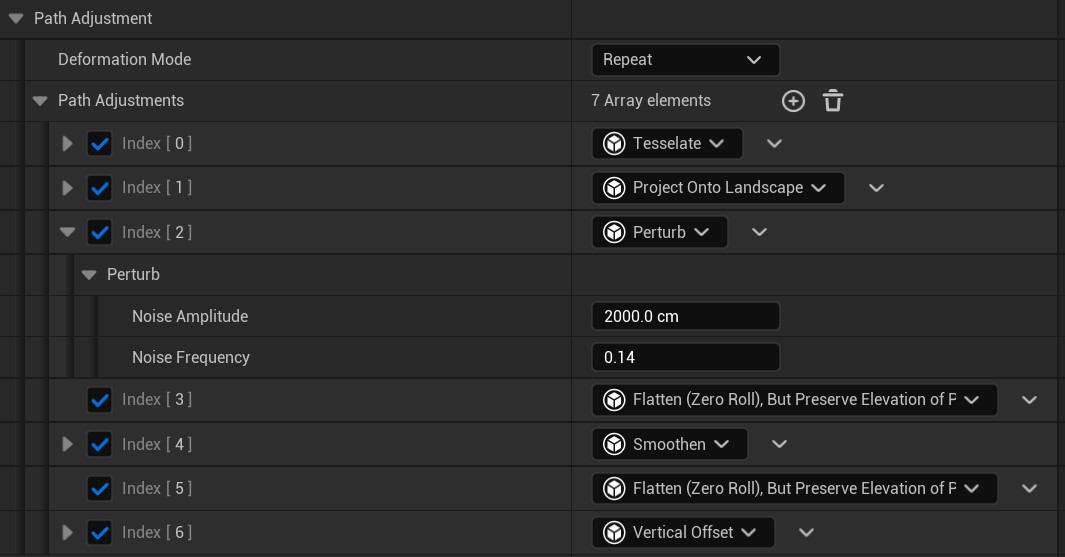
Errant Paths provides the following adjustments:
- Tesselate - see Tesselate.
- Copy Spline - see Dependent Paths.
- Perturb - see Perturb.
- Project Onto Geometry and Project Onto Landscape - see Project Onto Geometry/Landscape.
- Smoothen and Smoothen (Legacy) - see Smoothing.
- Vertical Offset - see Vertical Offset.
Custom adjustments
Path Adjustments are fully modular and Blueprint friendly, allowing you to implement your own processing of a Path's PathSpline and PreSpawnSpline.
We provide a Blueprint example of Path Adjustment that demonstrates all of this feature capabilities - incrementally add vertical offset to Path.
Override the Process function to implement your adjustment. If the operation is too expensive to complete in a single
frame but can be split across multiple frames, save any required state, process part of the work, and return false.
The system will call the Process again on the next tick, allowing the adjustment to resume where it left off.
Once processing is complete, return true.
To report the progress of a long-running adjustment, override the GetProgress function and return a value between 0.0
and 1.0, where 0.0 indicates processing has not started and 1.0 indicates it has finished.
Path adjustments are configured with a fixed set of properties in the Path Adjustment category of the PathDescription. They are applied in a fixed order and custom adjustments are not supported.