Unreferenced SubActors
- Errant Paths 1.2 and later
- Errant Paths 1.1 and prior
Paths store their generated content in SubActors. Each Path keeps a list of its SubActors and removes them when it is regenerated or deleted.
In rare cases, a SubActor can lose its connection to the Path, for example when only some of the modified files were saved or submitted to source control, or as a result of a bug. Such unreferenced (or "ghost") SubActors are no longer managed by any Path. They aren't removed when the Path is regenerated, so their content stays in the level and may overlap with the newly generated content.
A SubActor is considered unreferenced when:
- it doesn't point to any Path,
- the Path it points to doesn't exist,
- the Path it points to doesn't list it among its SubActors.
Unreferenced SubActors are also reported as errors during data validation.
Removing unreferenced SubActors
To remove unreferenced SubActors, open the Errant Paths Editor Mode, click the Tools button in the "Tools" section and use one of the two buttons:
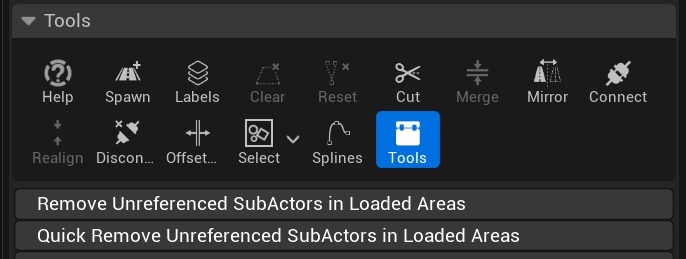
- Remove Unreferenced SubActors in Loaded Areas - loads the Path of each SubActor to check whether the Path references it. It detects all unreferenced SubActors, but loading the Paths may take a long time on large maps.
- Quick Remove Unreferenced SubActors in Loaded Areas - doesn't load the Paths. It relies on the Paths that are already loaded and, in World Partition levels, on checking whether the Path exists in the level. It's much faster and can be used on large maps where loading Paths would take too long, but it skips SubActors whose Paths aren't loaded and might not detect all unreferenced SubActors.
Both buttons only process SubActors that are currently loaded. To clean up the whole map, load all of its regions first, or clean it up region by region.
The name of each removed SubActor is printed in the Output Log. Save the level afterwards to delete the SubActors from disk.
Make sure your files are backed up or submitted to source control before removing SubActors, so the changes can be reverted if needed.
Tools for removing unreferenced SubActors are not available in Errant Paths 1.1 and prior.