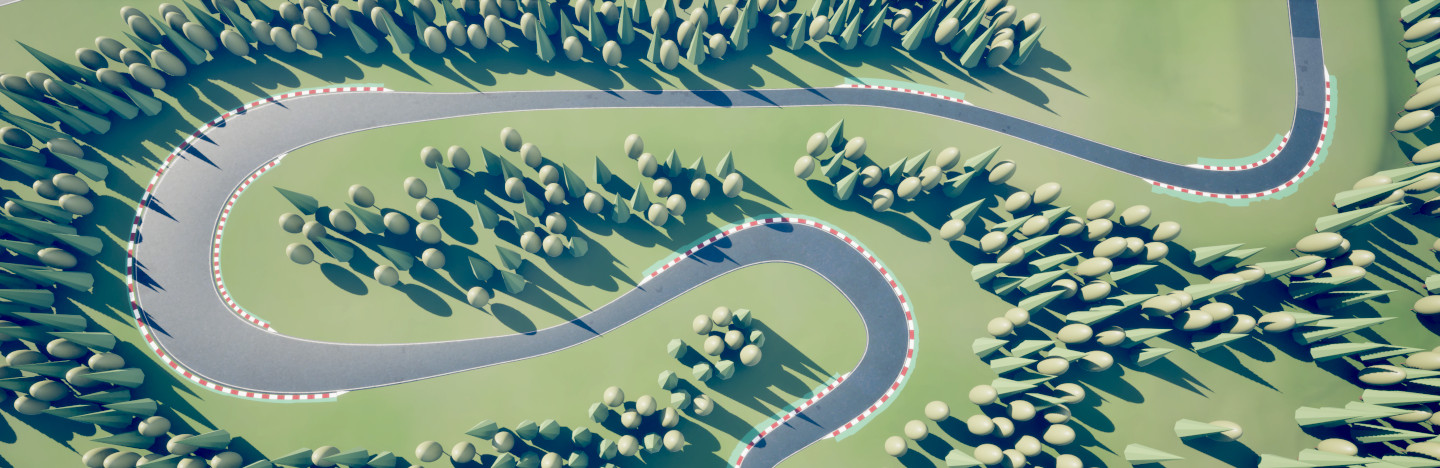
This update introduces variable-width Paths, MeshTerrain support, custom PathSpline Adjustments, and a host of other improvements and features.
Deprecations
We deprecated configuring landscape adjustment via PathSplines. Using this option triggers a Blueprint compilation error now. Use the dedicated Landscape Adjustment Spline (
EpLandscapeAdjustmentSplineComponent) instead. Existing PathSpline adjustment data is preserved internally so the Batch Upgrade Tool can still migrate old assets.The deprecated ability to override PathLayers for a PathTemplate has been removed in Errant Paths 1.2. Originally, it was needed to handle assets created before EP 1.0 release. However, it introduced complexity and cluttered UI for a marginal gain in flexibility. PathLayers need to be assigned per component now.
We have released version 1.3 of the Errant Paths Asset Library, which no longer uses PathLayer overrides.
- Use of NegX/NegY/NegZ axes in SplineMeshes is now deprecated as it caused mesh normals to flip and the mesh was rendering incorrectly. Unfortunately, we didn't find a way to solve this problem.
Features
Smart Scaling - Variable-width Paths
- You can now make parts of a Path wider or narrower by scaling PathSpline points.
Each mesh can be set to react differently to that scaling in one of three modes:
- fixed size - useful for lane markings in the center of a road
- move only - useful for road signs and guardrails that need to stay on the edge of a road
- move and scale - useful for the asphalt and concrete that need to get wider with the road
Smart Scaling will require further work to handle all real-world cases reliably. The main remaining issue is that bending parallel SplineMeshes usually creates gaps between them. This happens because we control and anchor only their start/end points, with limited control over their curvature in the middle. Roads also commonly use SplineMeshes with different lengths, widths, scales, and geometry densities, making this even more difficult.
For now, preventing gaps with Smart Scaling might require combining some meshes together (e.g. asphalt center + asphalt sides). We adjusted our examples and Asset Library accordingly and we plan to continue investigating potential solutions and improvements in this area.
Shallow Water integration
- We added an "EPD_ShallowRiver" example that uses the new
EpPathTemplateChildActorComponentto spawn Shallow Water River and Water Body River actors during Path generation and shape the WaterSplineComponent along the riverbed created by the Path's landscape adjustment.
Mesh Terrain integration
Mesh Terrain is an alternative terrain system in Unreal Engine that is based on meshes instead of a heightmap. Errant Paths 1.2 adds support for Mesh Terrain through the existing landscape adjustment workflow and shared settings. As a result, the same Path can now affect Landscapes and Mesh Terrains without requiring a separate setup.
PathSpline
Landscape-relative projection - we added a tool for adjusting PathSpline points' height above the landscape. By pressing Ctrl + W and scrolling the mouse wheel you can project Paths or a section of a Path to the landscape or at a given height above the landscape.
You can also define the preferred heights which the tool snaps to in a PathDescription. These values could represent the heights for each level of a highway in a complex interchange or subway tunnels at different depths.
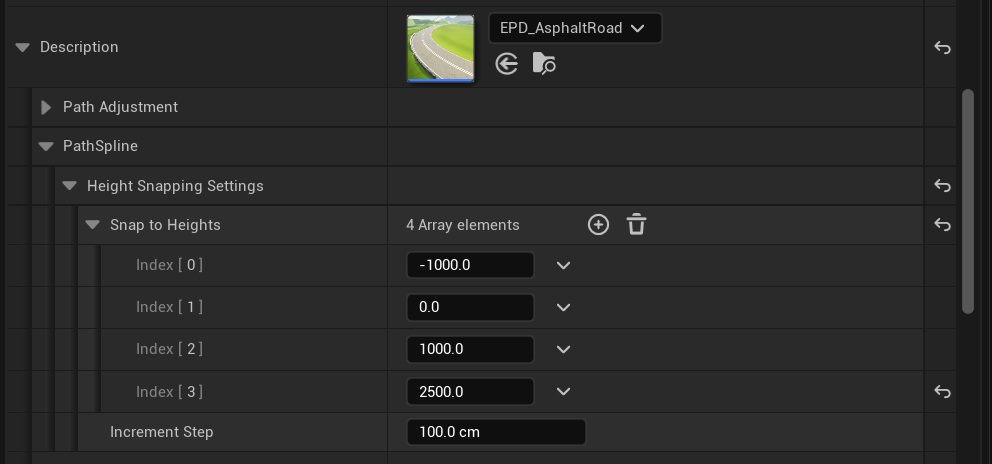
Pressing Ctrl + W and clicking the middle mouse button (MMB) resets the adjustment to the landscape height, and clicking the right mouse button (RMB) resets the adjustment to the original height.
This tool is used during Path editing and is separate from projection onto geometry/landscape performed during Path generation (Path Adjustments). Both of these systems can be used together.
A Path that is projected onto an uneven terrain during editing is usually still below or above the landscape in between the PathSpline points and may still require additional projection during the generation.
A good example of a Path that benefits from both of these projections is a dirt trail, as it needs to follow the terrain shape closely in between the PathSpline points.
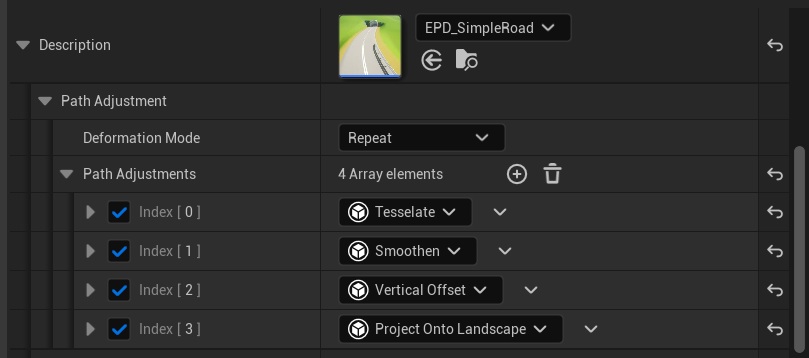
Custom PathSpline adjustments - You can now post-process Path splines using custom logic defined in Blueprints or C++ (derived from
UEpPathAdjustment) and reorder the operations freely. This opens the door for all kinds of post-processing, such as:- automated addition of roll in turns
- ensuring the Path doesn't exceed a certain incline angle
- ensuring the turn radius is changing gradually
- clamping the turn radius based on the road type
The fixed, built-in path adjustments we had before automatically convert to this new system, so no user action is required to migrate.
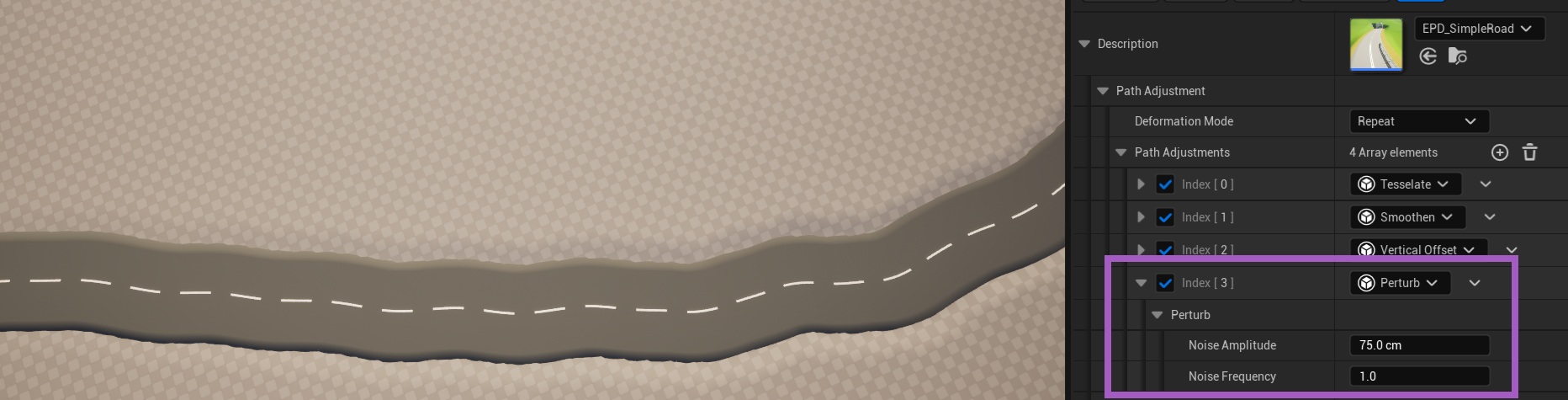
Perturbing the Path - as one of the new PathAdjustments, we added an option to perturb the PathSpline. This option is useful for rivers, trails, embankments, and damaged structures.
Blend Distance for Project Onto Landscape - One challenge of using Project Onto Landscape was the abrupt change of Path height near the first and last points of a Path, when first/last points were not projected on the landscape. To solve this problem, we introduced a setting that controls how quickly the projection is blended in at the start/end of the Path.
Offset Tool - We added a tool that allows offsetting a connection between two Paths forward or backwards, along these Paths. It's not only faster than doing it manually, but it also preserves curvature of the Paths.
Mirror Tool - This new tool allows mirroring Paths along the selected axis, in world-space or in local-space. It can operate on the selected Path or create a mirrored duplicate of that Path.
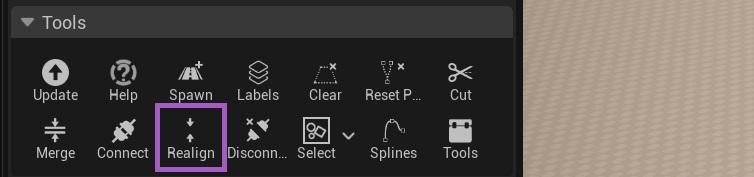
Realign Tool - We added a tool to realign two connected Paths that have become misaligned for any reason. Previously, users needed to disconnect and reconnect such Paths, which was inconvenient.
Landscape Adjustment
Detail Texture support - Weightmap/BiomesMask adjustments can now be driven from textures, similarly to Height adjustment. This allows adding a more natural perturbation to landscape coloring and foliage near roads, trails and rivers.
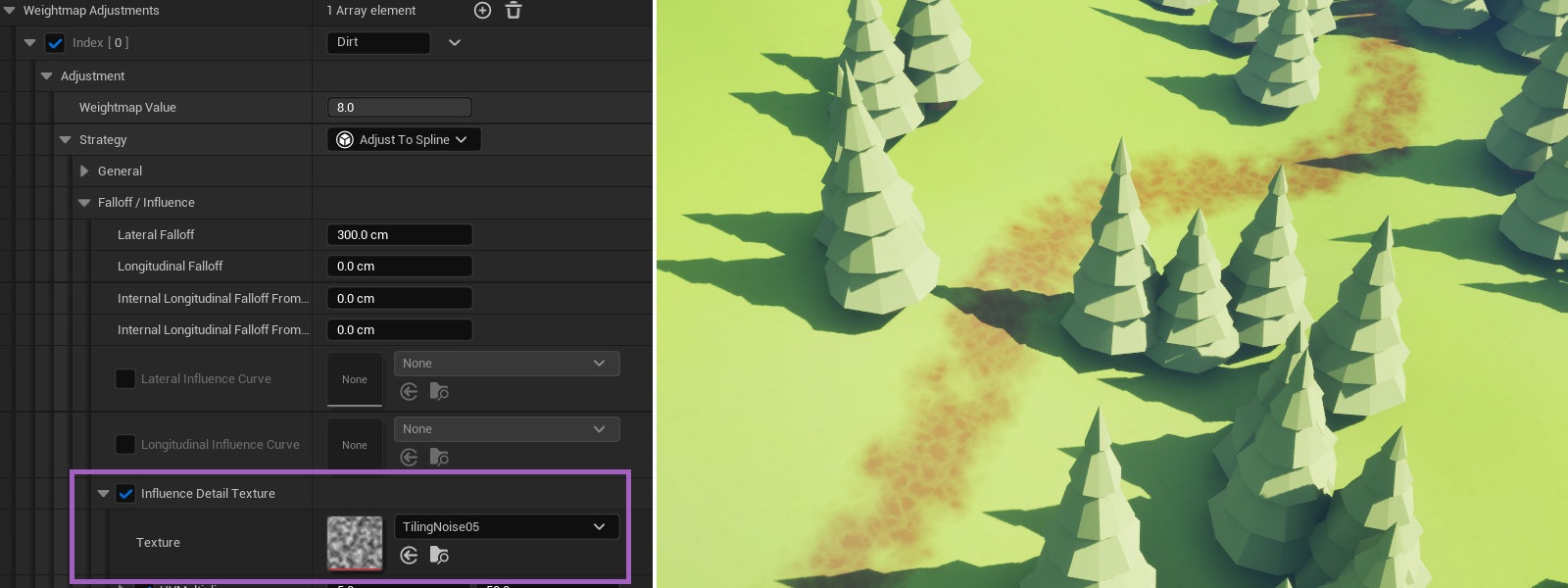
Weightmap/BiomesMask value control - up until now, Paths were always writing a value of one to weightmaps/BiomesMasks, multiplied by the optional curve value. This release adds a setting for controlling which value is written, sparing users the pain of creating custom curves to adjust the value. It also allows clearing weightmap values by writing a zero or subtracting from a weightmap by writing a negative value using an Additive adjustment strategy.

Lower memory usage for landscape adjustment - internal landscape adjustment meshes are no longer cached to disk and loaded to memory as soon as the Path is streamed in. They're now regenerated on demand, when a given Path needs to adjust the landscape for the first time (in the current Editor session). We also now unload these meshes from memory if a Path is not getting regenerated at least once every few minutes.
This allowed us to significantly reduce the memory usage in Editor for maps with many Paths, without a noticeable loss of generation performance.
By not caching these meshes, we also solved a rare crash that occurred for some users, where selected adjustment meshes would fail to load from the Derived Data Cache.
Spawning
Spawn actors from a Path - Paths now have a smarter way to spawn actors. Previously, users could use a ChildActorComponent in a PathTemplate to spawn actors. However, actors spawned this way would get recreated each time the level was loaded and each time the related ChildActorComponent was modified or reregistered. The new solution for spawning actors allows the Path to manage the actor's lifetime, recreating the actors only during the Path generation, similarly to Path components.
To spawn an actor using the new method, add a
UEpPathTemplateChildActorComponentin a PathTemplate and select a class it should spawn.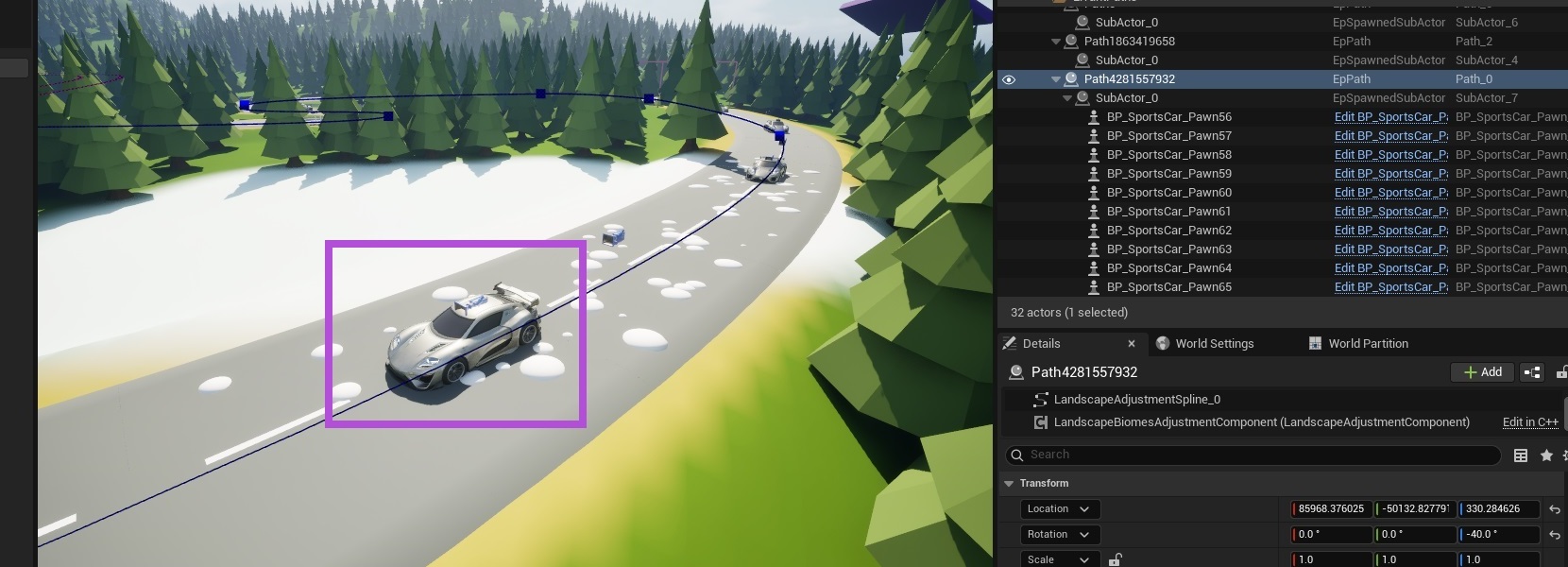
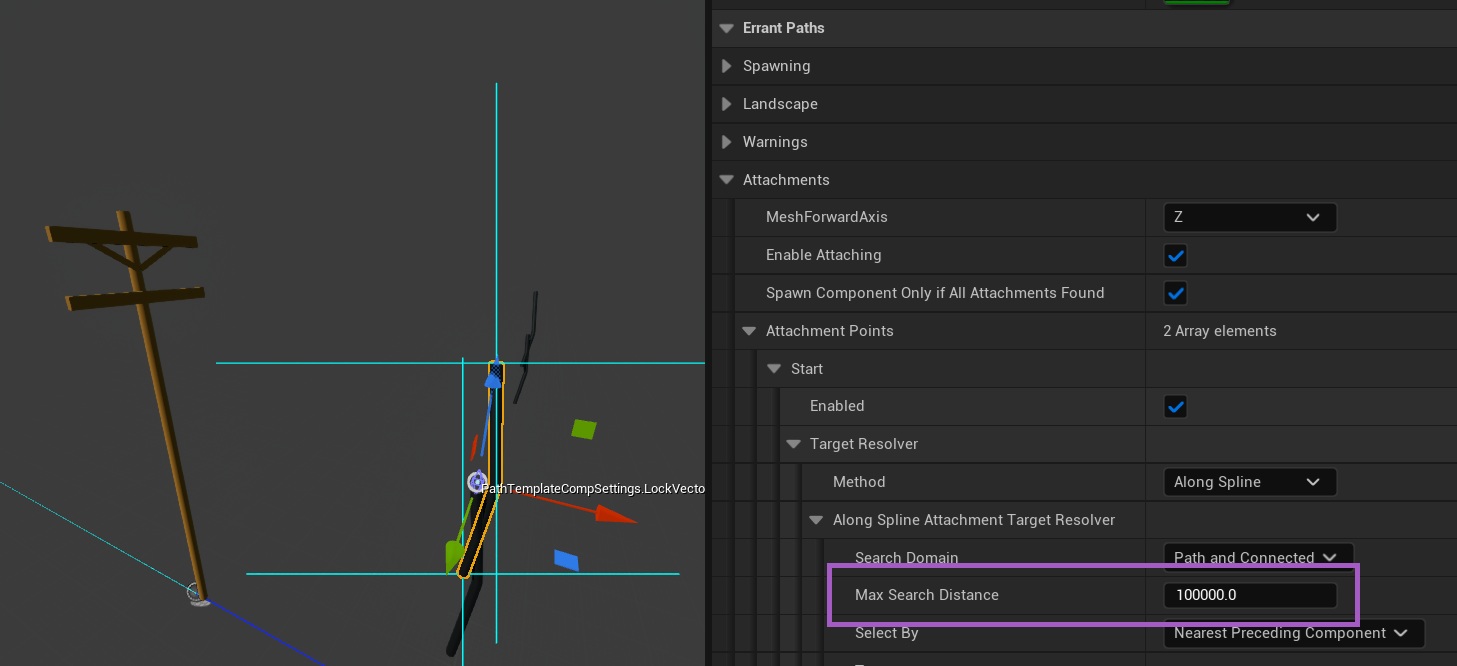
Max distance for cables/attachments - You can now set a maximum length for a cable/attachment to prevent unintended connections.
Sample connected Path Labels - when a SpawnCondition offset moves the sampling point outside of the current Path, it now correctly samples Labels from the connected Path instead. A potential use-case for this feature is adding right-of-way line markings at intersections that depend on the "priority" PathLabels of the connected Paths.
More examples
- We released a new version of Paths Asset Library (1.3) with more examples: roundabouts, cobblestone road, pier, castle walls, fence, racetrack. We also added a ShallowWater river and a dirt trail directly in the plugin.

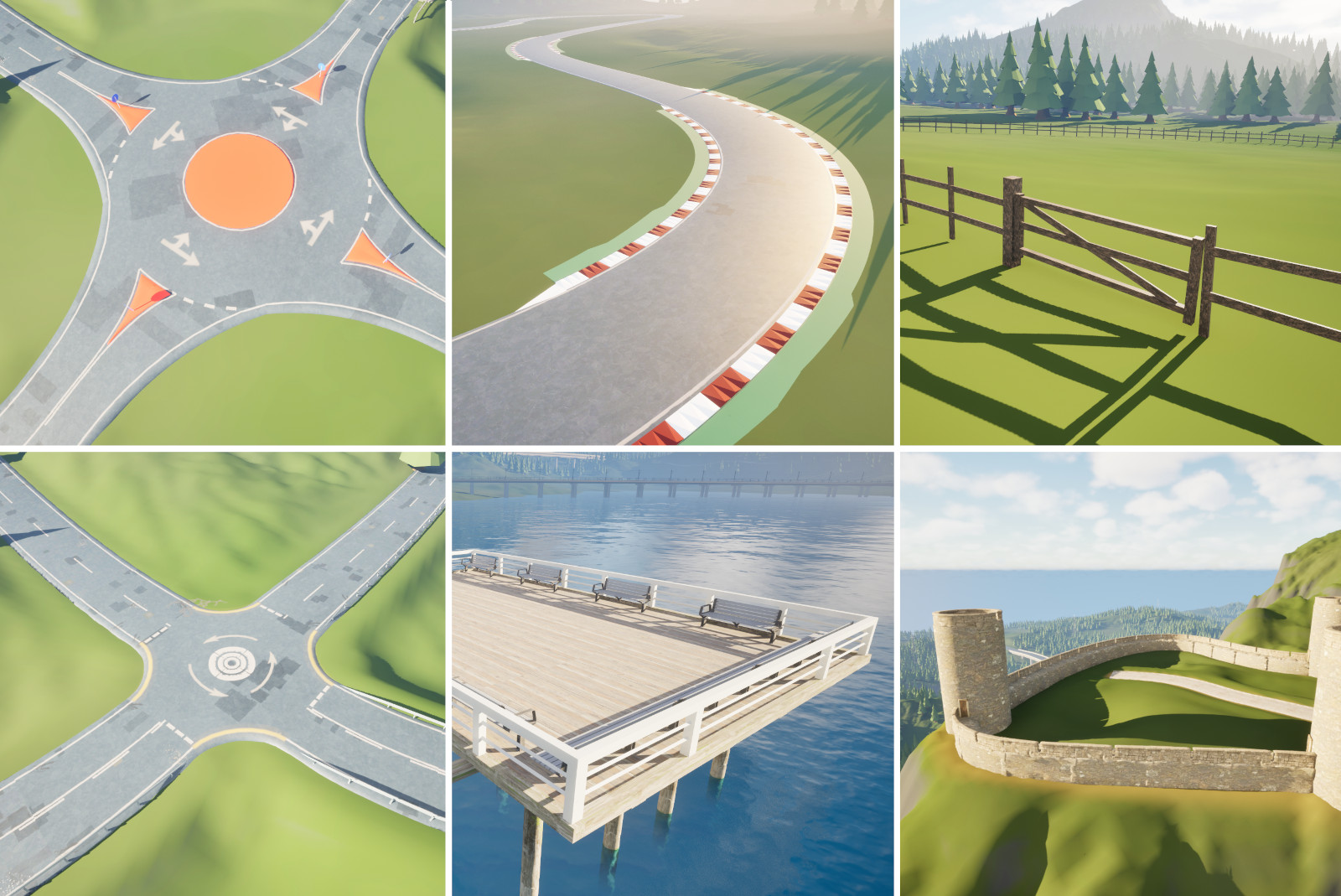
Errant Paths Asset Library 1.3 no longer uses the deprecated PathLayer overrides.
We merged asphalt center and edge meshes in the example roads to make them work better with Smart Scaling.
User Interface
Buttons related to Path generation are now separated from the editing tools.
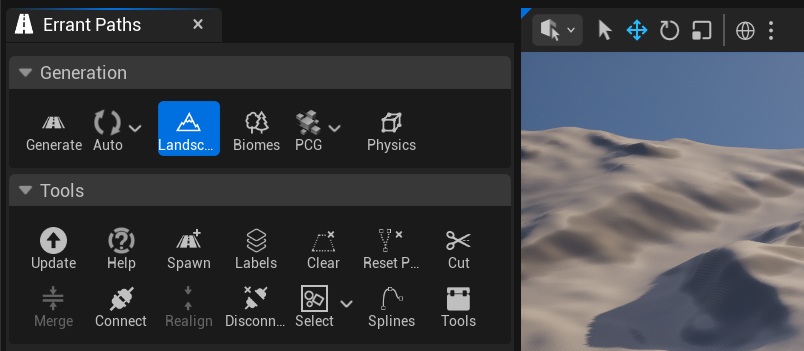
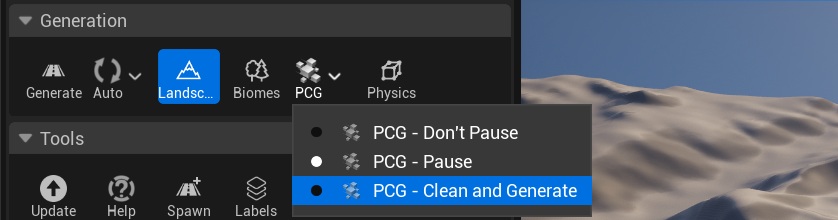
We moved PCG interaction settings from Path properties to the Errant Paths menu and added an extra option for interacting with PCG (see tooltips).
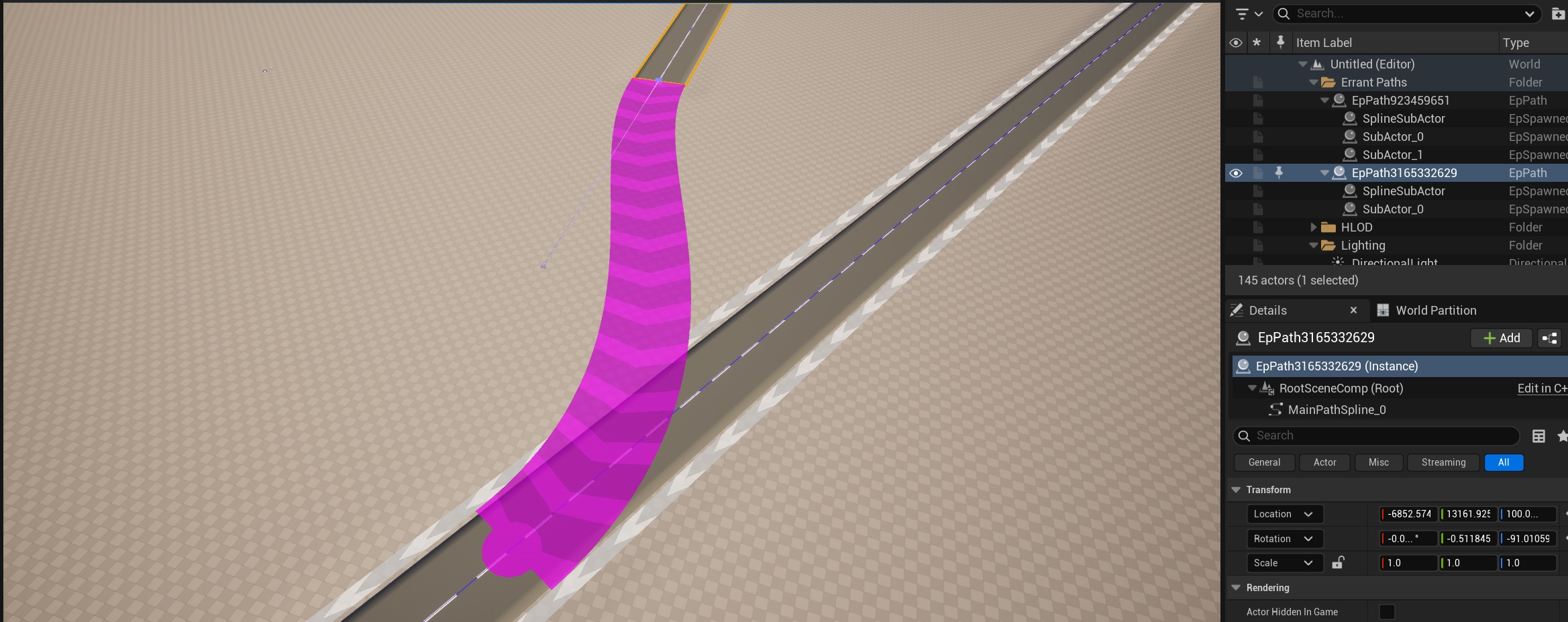
Path direction is now visualized as arrows on the pink visualization. We also added a grey visualization when connecting Paths. Displaying Path directions helps prevent mistakes such as connecting Paths backwards and creating a small loop.
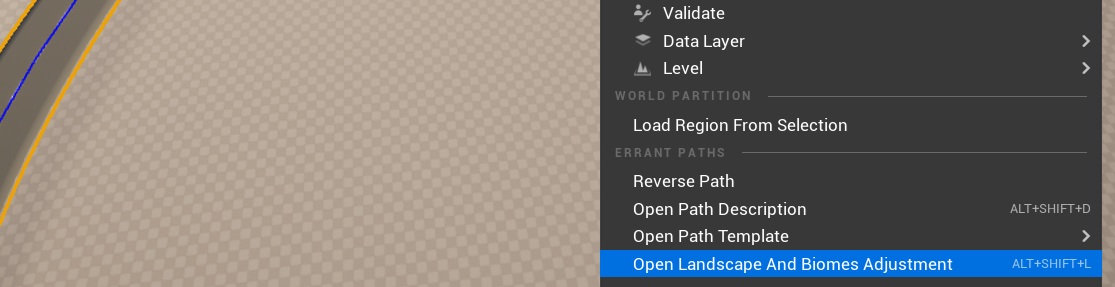
Right-click context menu of a Path now has a new entry that navigates to the Landscape/Biomes Adjustment Properties of the Path.
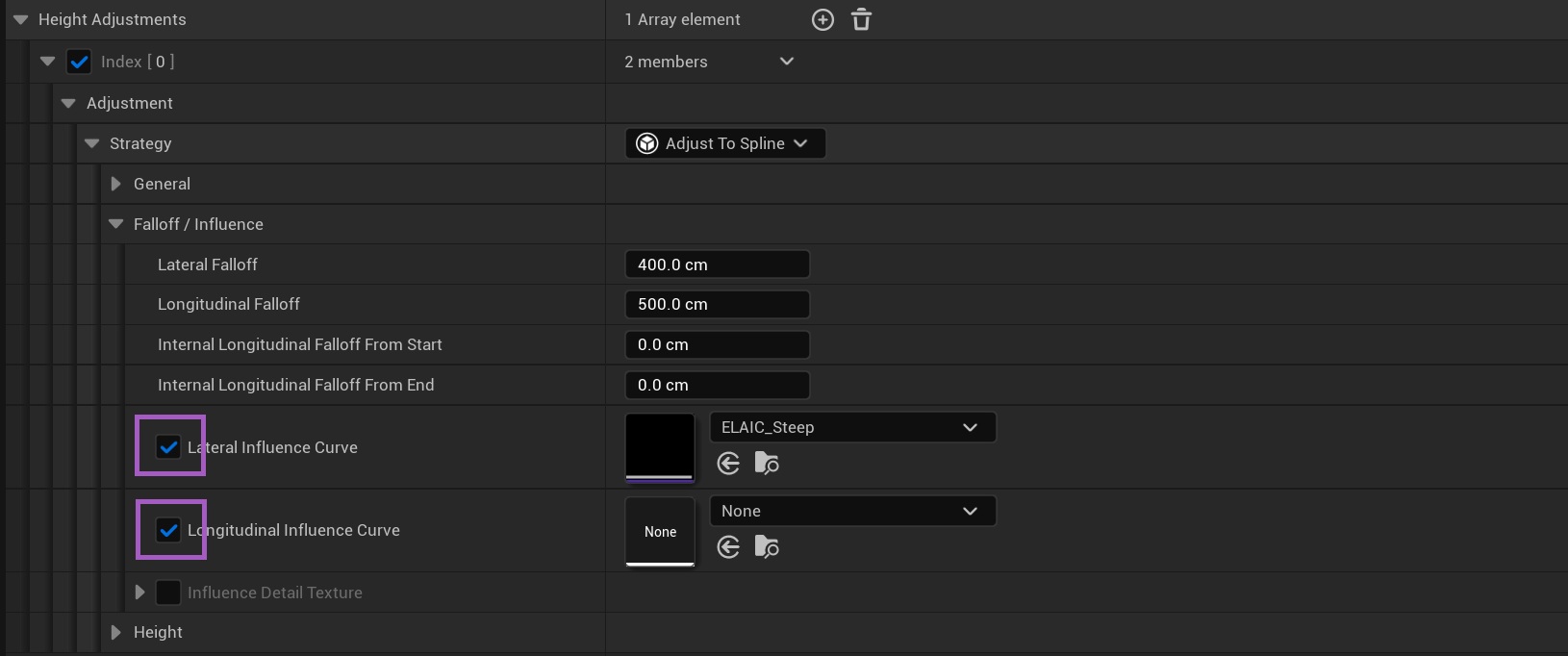
We added a checkbox that allows disabling adjustment curves in Landscape/Biomes Adjustment Properties without clearing the properties.
Possible viewport actions are now displayed in a more readable way.

Improvements
You don't need to hold Shift to force regenerate a Path anymore. All aspects of the Path are now regenerated on each generation, even if the Path doesn't seem to require regeneration. We made this change because it seems that most users, including ourselves, always regenerate Paths while holding Shift, and it simply became an inconvenience.
SubActors are now reused instead of being deleted and recreated on every update, which prevents unnecessary file adds and deletions in source control.
Paths inside Level Instances can no longer be edited or clicked unless the Level Instance is in Edit mode, preventing accidental edits. This also fixes Paths resetting and leaving ghost SubActors when entering/exiting Level Instance edit mode.
EpProjectComponentOntoGeometryGeneration Callback can now be called from PostSpawn or Pre/PostLandscapeAdjustment, giving you more control over when components get projected onto landscape.Paths can now log what system dirtied them, which is useful for debugging accidental Path modifications. The logging can be enabled in Editor Preferences -> Errant Paths -> Log Callstack When Path Gets Modified.
Assets now store metadata recording which plugin version they were last saved with. This allows us to detect which assets require upgrades without loading them into memory, making future upgrades faster.
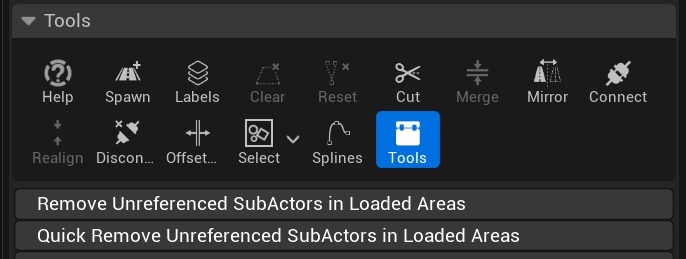
We now have two buttons for removing Unreferenced/Ghost SubActors. The first button loads Paths and then performs the check. The second doesn't load Paths and relies on validating internal pointer data. The second button can be used on large maps where loading Paths would take too long.
Performance
We now cache Path visualization mesh data instead of rebuilding it every frame. This improved editor performance when entering the Spawn, Cut, Connect or Ctrl+Q tools on maps with many Paths.
We fixed freezing landscape adjustment when Incremental Update is disabled, for maps with many Paths.
Bug Fixes
Crash Fixes
- Fixed a crash in landscape adjustment.
- Fixed a crash when compiling a PathTemplate (e.g. after renaming/duplicating StaticMesh components).
- Fixed a crash when dragging a plain static mesh onto an EPT.
- Fixed a crash when adding a non-SceneComponent to a PathTemplate.
- Fixed a crash in
AlignPathEnds. - Fixed a crash in
FindHoveredPath. - Fixed a crash in
FEpGeneralTool::FindAllPathConnectablePoints. - Fixed a crash when adjusting landscape after undoing Path spawning.
- Fixed a crash that could occur when collecting garbage after a non-incremental Path update.
Generation Fixes
- Fixed generation not progressing on UE 5.6 until all Paths were unselected.
- Fixed several issues affecting Errant Paths on UE 5.8.
- Fixed Paths spawned from a Blueprint resetting on every level reload or Editor restart.
- Fixed a parent's spawn probability incorrectly influencing the probability of its children.
- Fixed deleting a Path not clearing the landscape, including the edge case where it was the last Path on the level.
- Fixed Biomes not being cleared when a Path is cleared.
- Fixed being unable to regenerate a Path after its MainPathSpline was deleted.
- Fixed faulty Paths getting stuck in
CompleteUpdateOfDirtyPathsinstead of being skipped. - Reduced unnecessary Map/Level dirtying triggered by Path generation.
- Fixed landscape adjustment being cleared even when a Path didn't have the LandscapeBiomes update flag set.
- Fixed Map errors caused by adding Water plugins as dependencies.
- Fixed a bug in the commandlet that prevented World Partition regions from unloading.
- Fixed the commandlet creating duplicate SubActors.
- Fixed the commandlet failing to submit all modified files.
- Fixed unnecessary temporary components being spawned due to differing PathLayers.
- Fixed some EPTs incorrectly using PathLayers from the library or plugin content instead of the project's own.
- Fixed the T-shaped intersection mesh not rendering to Runtime Virtual Textures due to using Nanite.
- Fixed the RVT tangent/world-space normal switch on
MF_SwitchInputAttributesOrRVTdefaulting incorrectly; world-space is now the default. - Fixed the Stream example incorrectly using "Project First and Last Points", which made connected rivers start/end at different heights.
- Fixed EPT rescaling issues affecting Zone Graphs.
- Fixed GroupComponent rotation rotating meshes around their own origin instead of the group's origin.
- Fixed randomized scale not being passed to children (random location/rotation already was).
- Fixed child meshes being placed incorrectly when Stretch mode was used.
- Fixed cables in
EPT_Powerlinesometimes failing to attach. - Fixed gaps appearing between road meshes.
- Fixed
EPD_HighwayExtraLanenot spawning its cracks/dirt EPT. - Fixed disabling the elevated "Asphalt Cracks Patches Dirt" template preventing
EPD_HighwayExtraLanefrom spawning.
Landscape Adjustment Fixes
- Fixed Weightmap painting not working for some users due to GPU synchronization issues.
- Fixed inconsistent/glitching landscape adjustment due to GPU synchronization issues.
- Fixed landscape adjustment having sharp edges on very sharp turns.
- Fixed BiomesMasks not being written to when the Landscape Adjustment Spline has the same length as the MainPathSpline.
- Fixed one Path's landscape adjustment breaking a nearby Path's adjustment.
- Fixed BiomesMasks affected by Paths sometimes not working until Weightmap adjustment was enabled once.
- Fixed Paths failing to paint Masks after a Level was converted to World Partition.
- Fixed the lateral height shape curve not being used.
- Fixed a Path still adjusting its old Edit Layer after the LandscapeLayer name was changed in PathDesc.
- Fixed Paths that only adjust the landscape being incorrectly marked as modified.
- Fixed copying Height adjustment settings to Weightmap adjustment settings leaving some relevant settings hidden.
- Fixed incorrect landscape adjustment from nearby Paths that are only partially loaded.
- Fixed some Paths loading World Partition infinitely far in +X/+Y directions.
Path Editing Fixes
- Fixed deleting middle PathSpline points removing connections.
- Fixed connecting a Path to an intersection bending the intersection's PathSplines.
- Fixed moving a PathSpline point often corrupting the nearby connected end of the Path.
- Fixed Disconnect not working when multiple Paths were selected.
- Fixed roads sometimes not aligning roll properly to an intersection.
- Fixed duplicating a Path dirtying its connected Paths.
- Fixed a reversed Path's origin not updating until reselection.
- Fixed new PathSpline points not respecting snap size and rotation increments.
- Fixed selection being lost when entering the Spawn tool while creating Paths from existing splines.
- Fixed AutoGeneration deselecting a PathSpline point when adding new points.
- Fixed Connect always adding a new segment, even when one wasn't needed.
- Fixed AlongSplineResolver in Attachments not measuring distance correctly when an optional target transform and socket were set.
- Fixed Paths not getting saved (while remaining marked dirty) when their map is only partially loaded.
- Fixed several issues related to Path pinning, dirtying and Biomes Adjustment bounds.
- Fixed non-spatially-loaded SubActors forcing their parent Path to also become non-spatially-loaded.
- Fixed
EPT_Intersection_Xcompilation failing when its MainPathSpline is moved.
PathLabels Fixes
- Fixed PathLabel data getting corrupted when the PreSpawnSpline's "Distance Between Points" was decreased.
- Fixed using class variables stopping PathLabel generation.
- Fixed the LeftCliff/RightCliff detection PathLabels activating underground.
- Fixed Labels debug text drawing on top of itself.
- Fixed the Turn PathLabel activating for slope in some maps.
Visualization Fixes
- Fixed the Ctrl+Q pink outline not updating with cursor movement when the camera is close to a Path.
- Fixed the Cut indicator not being visible.
- Fixed Dirty Path visualization not updating after Undo or after a Cut.
- Fixed rendering some connections twice.
- Fixed excessive
DirtyPathVisMeshwarnings in the output log. - Fixed spawning two Paths one after another displaying the pink visualization incorrectly.
- Fixed the Path's gizmo and details panel not updating during an update.
- Fixed newly created Biomes Masks only being drawn after an Editor restart.
UI & Other Fixes
- Fixed the Errant Paths category appearing lower than expected in the component details tab on UE 5.6.
- Fixed restoring default Template groups in a PathDescription not always working.
- Fixed Unreferenced/Ghost SubActor validation failing for custom SubActor classes, blocking compilation.
- Fixed Unreferenced/Ghost SubActors appearing on certain maps.
- Fixed SubActors spawned by ChildPathActors being incorrectly treated as Unreferenced/Ghost.
- Fixed the "Remove unreferenced" button not working.
- Removed "Fit To Blueprint" button in the Blueprint Editor as it sometimes caused editing to stop working (likely by desyncing archetype/preview components).
- Fixed an enum loading error for
EEpRollDirectionwith an invalidOver0Degvalue. - Fixed Blueprint Editor selection getting cleared during PathTemplate compilation.
- Fixed reparenting a Blueprint causing
AEpPathto disappear from the class list on UE 5.7. - Fixed the Auto Regenerate button sometimes disappearing.
- Fixed the progress dialog repeating the same info when generating multiple Paths with Incremental Update disabled.
- Material compilation now fails (instead of silently sampling incorrectly) when a generic node is used to sample Errant Paths Biomes Masks instead of the dedicated node.
- Fixed "Landscape Edit Layer Order" and "Waiting for textures to Load" notifications showing multiple times.
- Renamed "Biome Mask" to "Biomes Mask" for consistency.
- Fixed Errant Paths classes failing to load during cooking/loading.
- Fixed material compilation warnings appearing when cooking on UE 5.6.
Mac
- We changed shortcuts such as Cmd + Q, Cmd + Space to other key combinations to avoid clashing with MacOS built-in shortcuts. We also fixed viewport messages and tooltips saying "Ctrl"/"Alt" instead of "Cmd"/"Option".